A team task board that shows who's doing what
Running the week out of your head, a whiteboard and a group chat? Boards puts every job in one place with a name next to it, so handing work over sticks and the conversation stays with the job.
- Free for 2 people and 10 boards, no time limit
- No card to start
- Sign in with Google or Microsoft, on your board in seconds
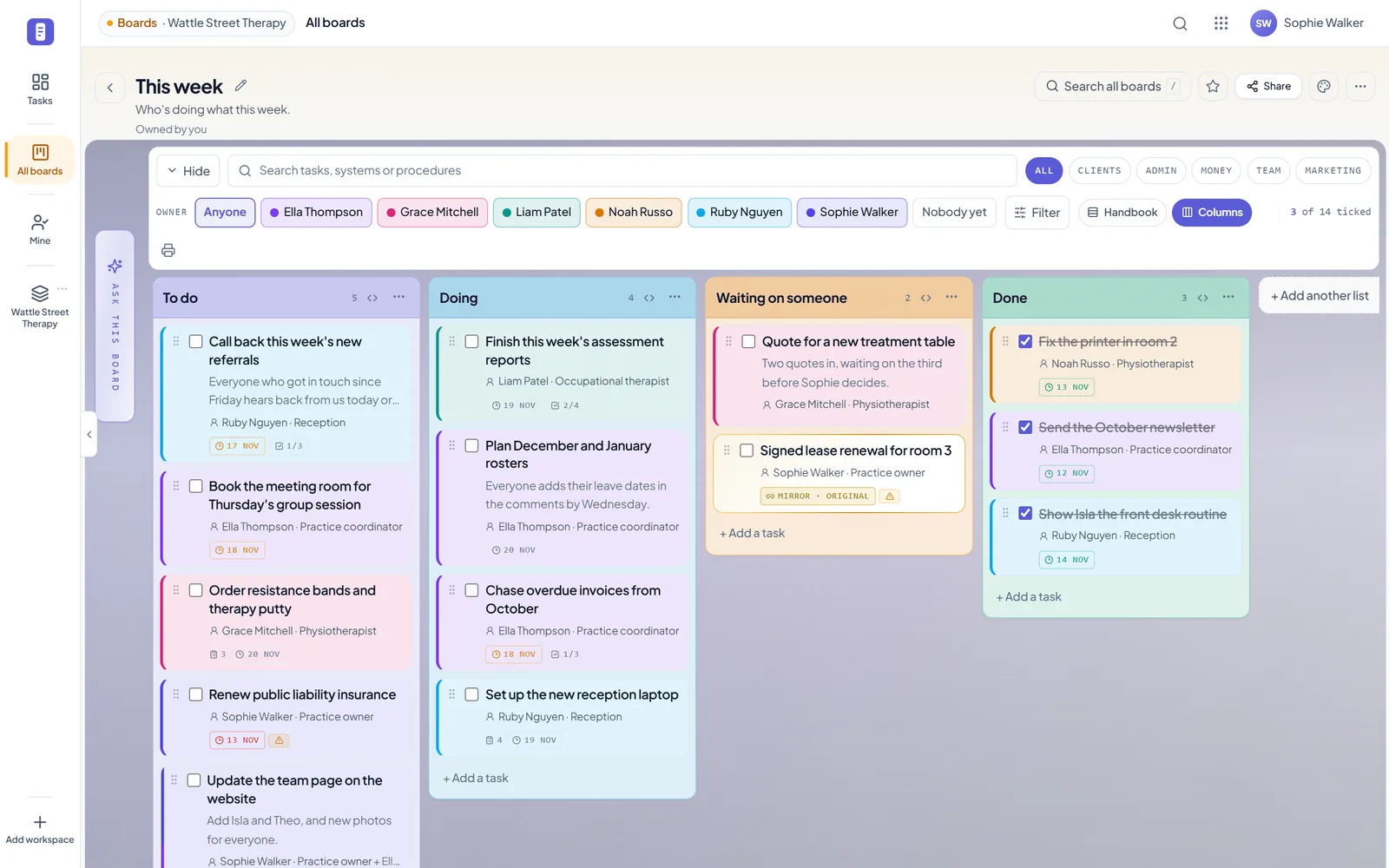
A made-up practice. Every name is invented.
Why teams switch
Three questions you shouldn't have to chase
Who's doing what this week?
Every job on the board has a name on it, and each person has their own colour. One click shows just one person's jobs, so you can answer the question in seconds.
Did that job actually get done?
Hand a job over in two clicks and the new owner gets a notification and an email. The card keeps who has it, when it's due and who changed it, and you drag it to Done when it's finished.
Where was that message?
Talk about the job on the job. Comments sit on the card, @mention someone to send them a notification and an email, and see who has read it.
How it works
Delegate tasks in four steps
Set it up in an afternoon, then run your Monday catch up from it.
- Step 1
Make a board
Start with lists like To do, Doing, Waiting on someone and Done, or name them your own way. Add a job in a line.
- Step 2
Put a name on every job
Give each job an owner and a due date. The owner gets a notification and an email, and their colour shows on the card.
- Step 3
Talk on the card
Ask a question or hand something over in the comments, and @mention the person who needs to see it.
- Step 4
Run the week from it
Filter by person in your Monday catch up, and let everyone open Mine to see every job with their name on it.
The conversation stays on the job
Comments on the card, not lost in a chat
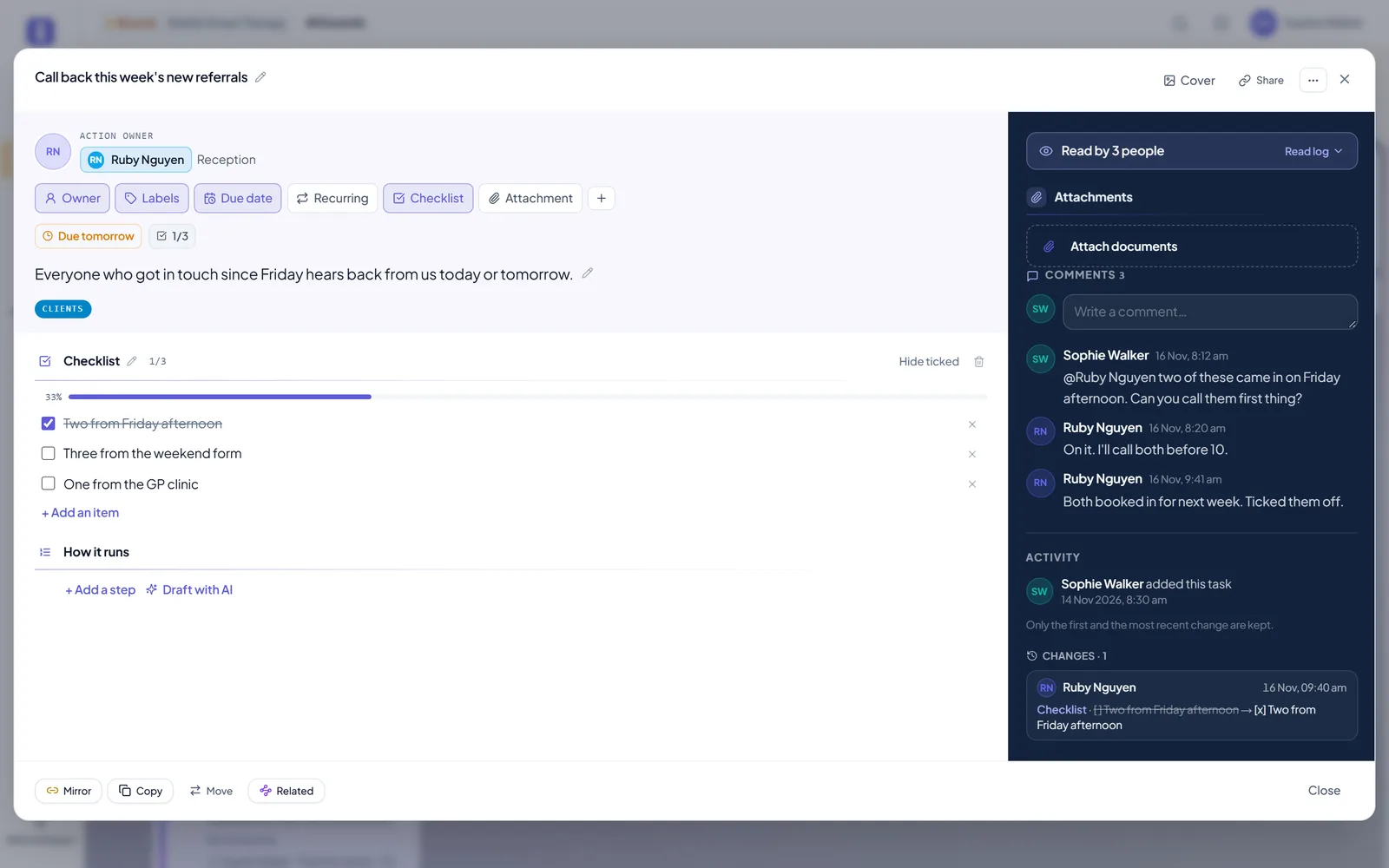
Ask the question on the job it's about. @mention a colleague and they get a notification and an email, tick off the checklist as you go, and see who has read the card.
Mine
Everyone knows what's on their plate
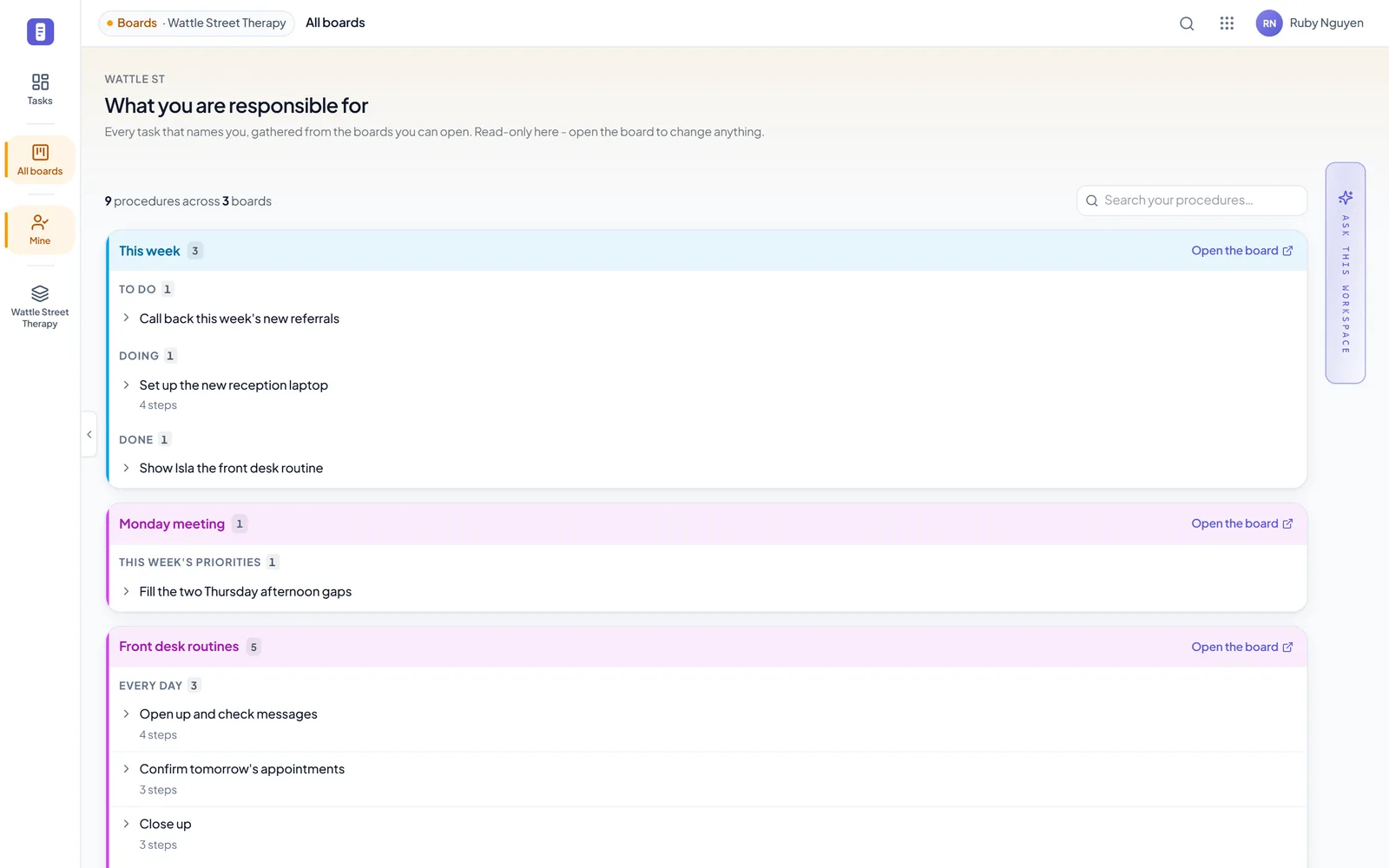
Mine gathers every job with your name on it from every board you can open, so nobody has to scroll a whole board to find their own work.
AI on your board
AI that works from what your team has written
It only runs when you ask it to, and it answers from your board, not from guesswork.
Build a board with AI
Describe the work in a sentence, or upload a procedure you already have, and AI drafts the lists and cards. You edit it from there.
Draft a card with AI
Give a card a title and AI suggests a description and the steps. It adds to what you've written and never writes over it.
Ask this board
Ask a question and get an answer from what's written on the board, with the card it came from. If the board doesn't cover it, it says so.
Write it up
Turn a board into a document: a step-by-step procedure, a summary, a training guide, a checklist or handover notes.
The free plan includes 30 AI credits a month, plus 30 for each extra person. Most AI actions use 5 credits; writing a whole board up uses 30.
Task management for small business
Everything a busy week needs on one board
A colour for every person
Each person gets their own colour on the board, and one click filters the board to their jobs.
Mine
Everyone sees every job with their name on it, across all the boards they can open, in one list.
People hear about their jobs
Make someone a card's owner, or type @ and their name in a comment, and they get a notification in Tasklith and an email.
Read by, and what changed
Each card shows who has opened it, and keeps a record of who changed the owner, the due date and more.
Due dates with a reminder
Overdue jobs go red, and the owner gets an email at 8am on the day a job is due.
Jobs that come back
Set a job to repeat every weekday or on the days you choose. Tick it off for today and it's back tomorrow, with an optional reminder email.
Checklists and steps
Several checklists on one card, numbered steps for how a job is done, files and links, all on the card.
Ready wording
Keep the exact words for a phone greeting or a reminder text on the card, with a Copy button.
One card on two boards
Put the same card on two boards. Change it once and it changes on both.
Search every board
Find a job, a step or a note across every board you can open.
Share the way you work
Open a board to everyone in your workspace, or only to the people you choose, with view or edit.
On your phone
Boards runs in the browser on a phone or a computer. Nothing to install.
Who it's for
Built for small teams, by a small team
We built Boards for our own allied health team and use it every day. It works just as well for any team of a few people.
Allied health and private practices
Front desk routines, referrals to call back, reports to finish and rosters to plan, all with a name on them. We built Boards for our own practice.
Trades and services
See which jobs are booked, who's on site, what's waiting on parts and what's ready to invoice.
Any small team of 2 to 20
If the week lives in your head, on a whiteboard and in a group chat, Boards puts it in one place everyone can see.
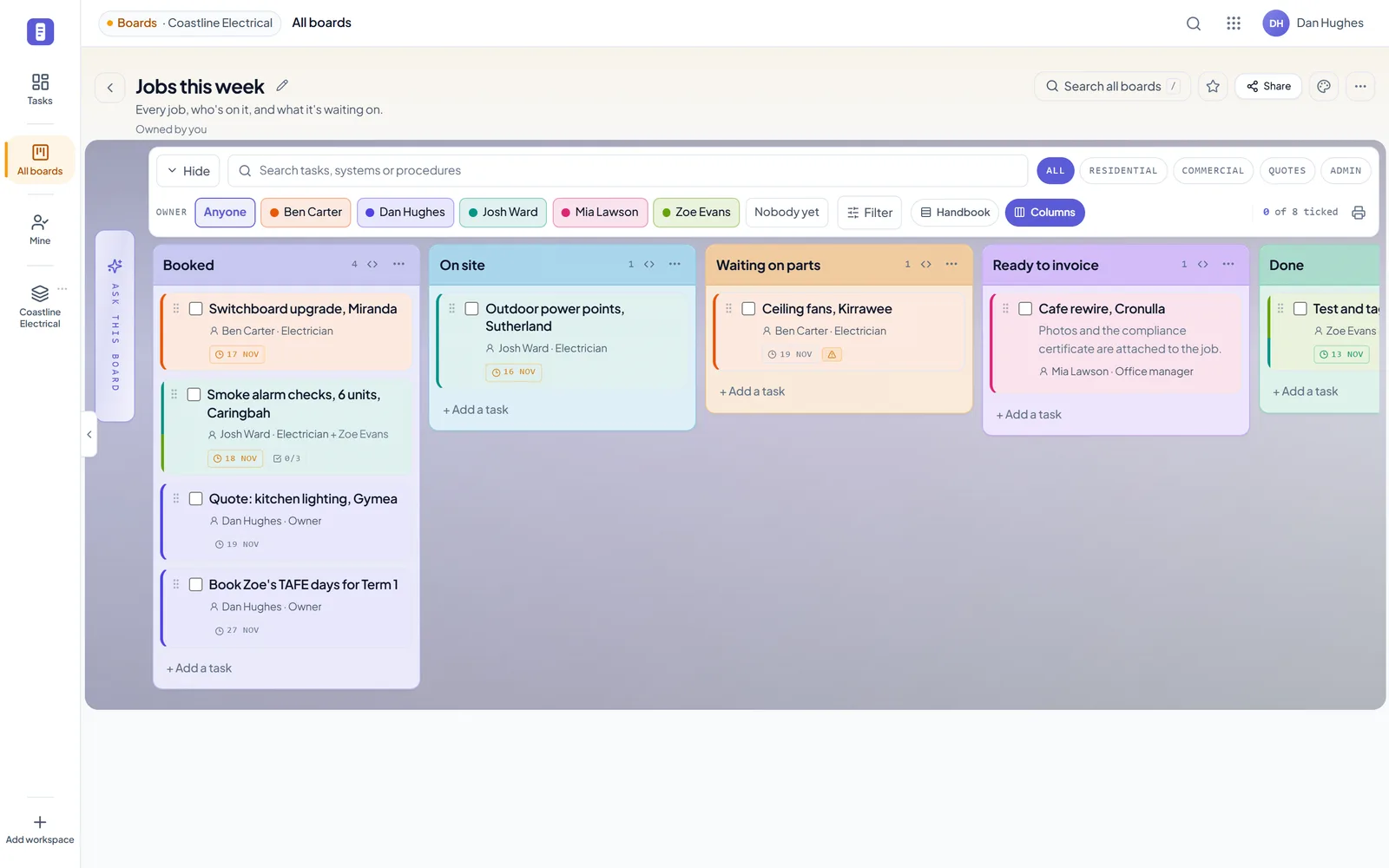
A made-up electrical business.
Pricing
Free to start, US$8.80 for each extra person
Boards is free for up to 2 people, 10 boards and 1 workspace, with no time limit and no card needed. Each extra person is US$8.80 a month (incl. GST). The first paid person gives you unlimited boards, and with 5 people you get unlimited workspaces. Month to month.
Questions
Team task boards, answered
What is Tasklith Boards?
Boards is a team task board. Each job is a card with an owner, a due date and its own comments, and the cards sit in lists you name yourself, such as To do, Doing and Done. You can see who's doing what at a glance, filter the board by person, and keep the conversation about a job on the job.
How do I see who's doing what this week?
Give every job an owner. Each person has their own colour on the board, and one click on their name shows only their jobs. Everyone can also open Mine to see every job with their name on it, across all the boards they can open.
How do I delegate a job so it actually gets done?
Hand it over on the card: change the owner and set a due date. The new owner gets a notification and an email straight away, and another email on the day it's due. The card shows who has it and who changed it, and you drag it to Done when it's finished.
Can we stop losing jobs in the group chat?
Yes. Put the job on a card and talk about it in the card's comments instead. The question, the answer and the decision stay with the job, and Read by shows who has seen it.
Does it handle jobs that repeat?
Yes. Set a job to repeat every weekday or on the days you choose, such as every Friday. Tick it off for today and it's back tomorrow. You can also email the owner a reminder at a time you choose.
Can my team use it on their phones?
Yes. Boards runs in the browser on a phone or a computer, so there's nothing to install. People sign in with their Google or Microsoft account.
How long does it take to get started?
Seconds. Sign in with your Google or Microsoft account, name your business, and you're on your board. To keep your account safe you'll also set up an authenticator app, such as Google Authenticator or Microsoft Authenticator: do it straight away (on a phone it's one tap), or press Set up later and do it within 7 days.
Does Boards use AI?
Yes, when you ask it to. AI can build a board from a sentence or a document you upload, draft a card's description and steps, answer questions from what's written on a board (showing the card it came from), and write a board up as a procedure, summary or training guide. The free plan includes 30 AI credits a month, plus 30 for each extra person. Most AI actions use 5 credits, and writing a whole board up uses 30.
How much does Boards cost?
Boards is free for up to 2 people, 10 boards and 1 workspace, with no time limit and no card needed. Each extra person is US$8.80 a month (incl. GST), the first paid person gives you unlimited boards, and with 5 people you get unlimited workspaces. Month to month.

Know who's doing what by Monday
Put this week's jobs on a board, put a name on each one, and run your next catch up from it.